

 Security policy
(edit with the Customer Reassurance module)
 Delivery policy
(edit with the Customer Reassurance module)
 Return policy
(edit with the Customer Reassurance module)
Specifications:
1.Working voltage: 100-240V 50/60HZ
2.Maximum current: 10A/16A /20A optional
3.Housing: ABS+PC fireproof material
4.Specifications: American standard plug(US Plug)
6.Working temperature: -20 ° C - 50 ° C
7.Wifi:IEEE 802.11 b/g/h 2.4Ghz
8.Network security level: WPA/WPA
9.Standby power consumption<0.7W
10.With power monitor & Nopower monitor optional
Your Home. One App.
Support "Tuya Smart "/ "Smart Life" APP
The Smart Life app works with lots of smart home devices, allowing for easy control of your home from any Android or iOS device.
Voice Control
The smart plug works with Alexa, Google Assistant supported devices for easy voice control.
No Hub Required
The smart plug works with any secured 2.4 GHz wireless network without the need for a separate hub.
Wireless control mode
Voice control + APP control
Works perfectly with Amazon Alexa,Google Home,
Countdown function
You can set a countdown for humidifiers, microwaves, coffee machines and more. The device will stop automatically. Don't worry about the device working all the time
Timing Function
Set the time to turn on the light.
Set time to cook rice..
Power-off Memory Function
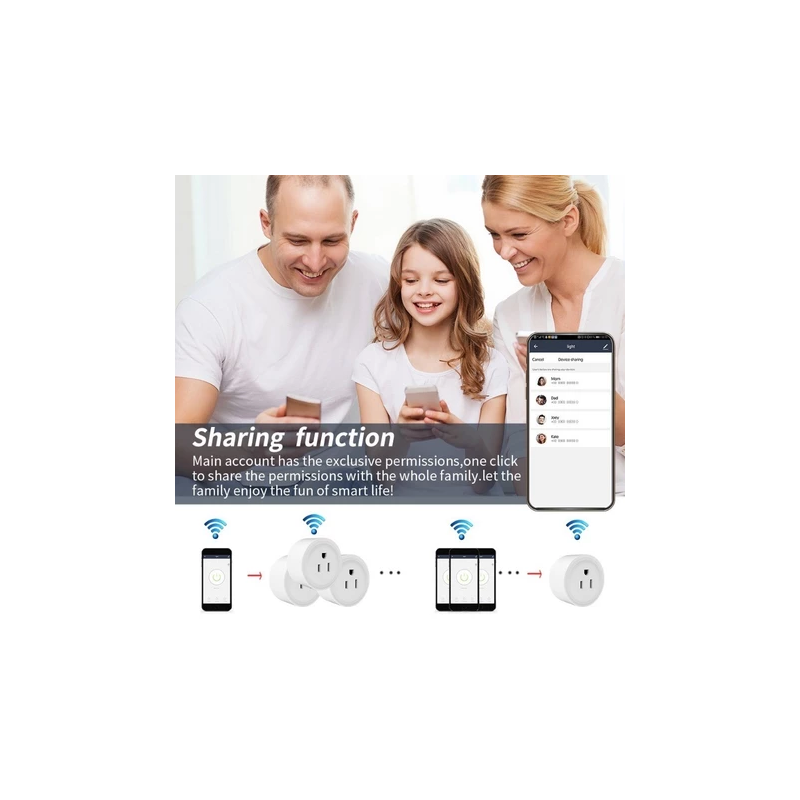
Family Sharing Control Fun
main account has the exclusive permissions,one click to share the permissions with the whole family.let the family enjoy the fun of smart life!
With power monitor & Nopower monitor optional
Product specifications with or without metering available according to your needs
How to add device to mobile app
1.Scan the QR-code of the manual or Search ‘ Smart Life ’ to download and install the device's APP
2.After the wiring is completed, turn on the power and operate according to the status of the smart switch indicator:
3.If the red light of the smart switch flashes continuously at this time, it indicates that the smart switch has entered the state of waiting for connection to WiFi; then open the APP and follow the instructions to connect to WiFi.
4. If the indicator light of the smart switch is not flashing red light, please press the button of the smart switch and keep it for more than 5 seconds until the red light flashes continuously, then open the APP and connect to the WiFi according
![[ Original ] Orange Pi One 1GB / Opi Zero3 1.5GB Kit Mini PC Computer For Piso Wifi Kit With Cable](https://shop.softtechservices.net/207-home_default/-original-orange-pi-one-1gb-opi-zero3-15gb-kit-mini-pc-computer-for-piso-wifi-kit-with-cable.jpg)