

 Security policy
(edit with the Customer Reassurance module)
 Delivery policy
(edit with the Customer Reassurance module)
 Return policy
(edit with the Customer Reassurance module)
please note we don't recommend this product to this Brand Mobile Phone below because some of their Model phone are not compatible.
1. Infinix
2. techno
【About Product】
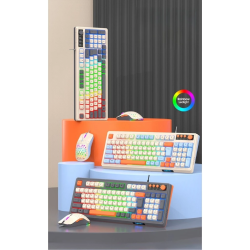
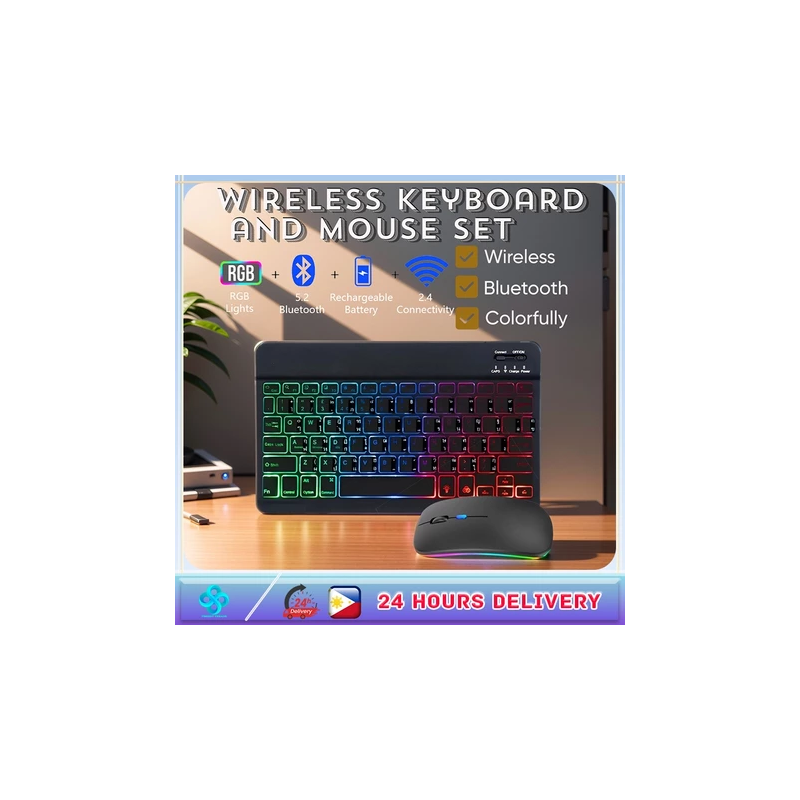
This keyboard has a backlight function, the backlight color can be changed, there are a total of 7 colors.
The keyboard is rechargeable.
1: Please change the language on the tablet instead of the keyboard.
2: The keyboard can be compatible with Android / Windows / OS systems
3: Charging voltage: 5V1A
4: Interface: Micro USB
5: Material: ABS + aluminum alloy
6: Compatibility: Windows / Android /
7: 10 inches: 15 * 25CM weight
8: The keyboard is not compatible with the TV.
9:Ordinary mouse: battery model,rbg Rechargeable
Requirements for the use of different systems:
For ios:
Keyboard and mouse are compatible with Phone and pad and book. The mouse can be used with a system above ios13, while the keyboard does not have a system version requirement.
For Android:
Keyboard and mouse are compatible with Android phones and Android tablets, provided that your device has Bluetooth function.
For Windows:
keyboard and mouse are compatible with PC and laptop, provided that your device has Bluetooth function, the keyboard can be used. The mouse can be connected via a USB receiver or connected via Bluetooth.
Bluetooth connection method:
1. All "open" buttons on the keyboard
2. Press the clerk's "connect" button and hold for 2 seconds
3. Open the Bluetooth app you should connect to
4. Click Bluetooth, click the 3.0 button on the app, and then click the connection option.
![RYZEN 5 3400G GAMING SET [8GB/16GB RAM DDR4] [256GB SSD] [VEGA GRAPHICS] [1 YR WARRANTY]](https://shop.softtechservices.net/845-home_default/ryzen-5-3400g-gaming-set-8gb-16gb-ram-ddr4-256gb-ssd-vega-graphics-1-yr-warranty-.jpg)